

Description
WordPress uses the PHP mail() function by default, which often results in emails being marked as spam or not delivered at all. Frumbik SMTP replaces the default mail function with authenticated SMTP or API-based email delivery through your chosen provider.
Connect Gmail, SendGrid, Amazon SES, or any SMTP server — and all emails WordPress sends will be properly authenticated, encrypted, and delivered.
Key Features
Frumbik SMTP provides the following capabilities, all included in the free version:
🔄 Automatic Failover — If your primary provider goes down, emails automatically route to your backup provider.
📊 Dashboard — Real-time delivery stats, success rates, and charts. See what is happening with your emails at a glance.
📋 Complete Email Log — Every email logged with status, timestamps, headers, and source plugin. Search, filter, resend, or export — all from one screen.
🔐 Strong Security — AES-256-CBC encryption for all credentials. Security scoring dashboard with actionable recommendations.
⚡ Background Queue — High-traffic site? Queue emails for async delivery so your pages load fast while emails send in the background.
🎯 Smart Routing — Route WooCommerce emails through SendGrid, contact forms through Mailgun, and newsletters through Amazon SES — all automatically.
9 Providers, One Plugin
Connect to any email service without installing separate add-ons:
- Other SMTP — Any SMTP server (Gmail, Outlook, Yahoo, your hosting, custom servers)
- SendGrid — Transactional email API by Twilio
- Mailgun — Email API by Sinch
- Postmark — Transactional email delivery by ActiveCampaign
- Brevo (formerly Sendinblue) — Marketing and transactional email
- SparkPost — Email delivery by MessageBird
- Amazon SES — AWS Simple Email Service (v2 API with Signature v4)
- Microsoft 365 / Outlook — Microsoft Graph API with OAuth 2.0
- Gmail API — Google Gmail API with OAuth 2.0
All providers are included in the plugin.
Core Features
📨 Reliable Email Delivery
- Replace WordPress’s unreliable
wp_mail()with authenticated SMTP or native API connections - Supports TLS and SSL encryption protocols
- Proper SPF, DKIM, and DMARC alignment through your provider
- Works with any WordPress theme, plugin, or page builder
📋 Comprehensive Email Logging
- Every outgoing email logged automatically — sent, failed, or queued
- Full details: recipients, subject, body, headers, attachments, timestamps
- Automatic source detection — know which plugin triggered each email
- One-click resend for failed or bounced emails
- CSV export with advanced search and filtering
- Configurable log retention (auto-cleanup old logs)
🔄 Multi-Connection & Failover
- Configure multiple mail providers simultaneously
- Automatic failover — if Provider A fails, Provider B takes over instantly
- No manual intervention needed. No lost emails during outages.
- Connection health monitoring with success rate tracking
🎯 Smart Routing Rules
- Route emails to different providers based on conditions:
- Recipient email address or domain
- Email subject containing specific keywords
- The WordPress plugin that triggered the email
- Example: WooCommerce orders SendGrid, contact forms Mailgun
- Priority ordering with drag-free interface
⚡ Email Queue (Async Sending)
- Queue emails for background delivery via WP-Cron
- Pages load faster — no waiting for SMTP connections during page loads
- Failed emails automatically retried with exponential backoff
- Configurable batch size and retry limits
- Real-time queue dashboard with cancel/retry controls
🔔 Failure Notifications
- Get alerted instantly when emails fail to send
- 4 notification channels: Email, Slack, Discord, Telegram
- Per-event subscription — choose exactly which events trigger alerts
- Notification history with delivery status tracking
🔐 Security
- AES-256-CBC encryption for all stored credentials (passwords, API keys, OAuth tokens)
- Security Score Dashboard — real-time security posture with actionable fix recommendations
- Dedicated encryption key support via
wp-config.php - Rate limiting on all REST API endpoints
- Six custom WordPress capabilities for role-based access control
- Full audit log tracking every configuration change
- CSRF protection, nonce verification, input sanitization throughout
🧙 Setup Wizard
- Guided 7-step wizard for first-time configuration
- Automatic import from WP Mail SMTP, Post SMTP, Fluent SMTP, and Easy WP SMTP
- Provider presets with pre-filled configuration fields
- Built-in connection test with real-time feedback
🛠️ Import / Export & Tools
- Export your complete configuration as a JSON file (settings, connections, routing rules)
- Import on another site to replicate your setup instantly
- Debug Info page with system diagnostics for troubleshooting
- Multisite-compatible import/export
🖥️ Modern Admin Interface
- React-powered single-page application — fast and responsive
- Real-time dashboard with delivery charts and statistics
- Responsive design for desktop, tablet, and mobile
- Built with WordPress accessibility standards (WCAG 2.1)
- Full internationalization support (i18n-ready)
🌐 Multisite Ready
- Full WordPress Multisite support out of the box
- Network-wide or per-site configuration
- Network admin management panel
- Settings propagation across all network sites
For Developers
- Hooks & Filters — 30+ action and filter hooks for complete customization
- IoC Container — Laravel-inspired dependency injection container
- PSR-4 Autoloading — Clean, namespaced codebase via Composer
- REST API — Full REST API for headless or programmatic management
- Extensible Providers — Add custom mail providers by implementing
MailProviderInterface - Strategy Pattern — Clean architecture with strategy, repository, and service provider patterns
External services
This plugin connects to third-party email delivery services and notification platforms to send emails and alerts on your behalf. No data is sent to any service unless you explicitly configure and enable that provider or notification channel in the plugin settings.
Gmail API (Google)
When configured as a mail provider, this plugin connects to the Gmail API to send emails using your Google account via OAuth 2.0.
- Endpoints:
https://gmail.googleapis.com,https://accounts.google.com,https://oauth2.googleapis.com - Data sent: email content (recipients, subject, body, headers, attachments), OAuth tokens for authentication
- When: each time WordPress sends an email through this provider, and during OAuth authentication
- Google Privacy Policy
- Google Terms of Service
Microsoft 365 / Outlook (Microsoft Graph API)
When configured as a mail provider, this plugin connects to the Microsoft Graph API to send emails using your Microsoft 365 or Outlook account via OAuth 2.0.
- Endpoints:
https://graph.microsoft.com,https://login.microsoftonline.com - Data sent: email content (recipients, subject, body, headers, attachments), OAuth tokens for authentication
- When: each time WordPress sends an email through this provider, and during OAuth authentication
- Microsoft Privacy Statement
- Microsoft Services Agreement
SendGrid (Twilio)
When configured as a mail provider, this plugin sends emails through the SendGrid API.
- Endpoint:
https://api.sendgrid.com/v3 - Data sent: email content (recipients, subject, body, headers, attachments), API key for authentication
- When: each time WordPress sends an email through this provider
- Twilio Privacy Policy
- Twilio Terms of Service
Mailgun (Sinch)
When configured as a mail provider, this plugin sends emails through the Mailgun API.
- Endpoints:
https://api.mailgun.net/v3(US region) orhttps://api.eu.mailgun.net/v3(EU region) - Data sent: email content (recipients, subject, body, headers, attachments), API key for authentication
- When: each time WordPress sends an email through this provider
- Mailgun Privacy Policy
- Mailgun Terms of Service
Brevo (formerly Sendinblue)
When configured as a mail provider, this plugin sends emails through the Brevo API.
- Endpoint:
https://api.brevo.com/v3 - Data sent: email content (recipients, subject, body, headers, attachments), API key for authentication
- When: each time WordPress sends an email through this provider
- Brevo Privacy Policy
- Brevo Terms of Use
SparkPost (MessageBird)
When configured as a mail provider, this plugin sends emails through the SparkPost API.
- Endpoints:
https://api.sparkpost.com/api/v1(US) orhttps://api.eu.sparkpost.com/api/v1(EU) - Data sent: email content (recipients, subject, body, headers, attachments), API key for authentication
- When: each time WordPress sends an email through this provider
- SparkPost Privacy Policy
- SparkPost Terms of Use
Postmark (ActiveCampaign)
When configured as a mail provider, this plugin sends emails through the Postmark API.
- Endpoint:
https://api.postmarkapp.com - Data sent: email content (recipients, subject, body, headers, attachments), server API token for authentication
- When: each time WordPress sends an email through this provider
- Postmark Privacy Policy
- Postmark Terms of Service
Amazon SES (Amazon Web Services)
When configured as a mail provider, this plugin sends emails through the Amazon SES v2 API using AWS Signature v4 authentication.
- Endpoint:
https://email.{region}.amazonaws.com(region depends on your configuration) - Data sent: email content (recipients, subject, body, headers, attachments), signed with AWS access key credentials
- When: each time WordPress sends an email through this provider
- AWS Privacy Notice
- AWS Service Terms
Telegram Bot API
When configured as a notification channel, this plugin sends failure alerts to a Telegram chat using the Telegram Bot API.
- Endpoint:
https://api.telegram.org/bot{token}/sendMessage - Data sent: notification messages containing email failure details (recipient, subject, error message, timestamp)
- When: each time a configured notification event occurs (e.g., email delivery failure)
- Telegram Privacy Policy
- Telegram Terms of Service
Slack
When configured as a notification channel, this plugin sends failure alerts to a Slack channel using incoming webhooks.
- Endpoint: user-configured Slack webhook URL (
https://hooks.slack.com/services/...) - Data sent: notification messages containing email failure details (recipient, subject, error message, timestamp)
- When: each time a configured notification event occurs (e.g., email delivery failure)
- Slack Privacy Policy
- Slack Terms of Service
Discord
When configured as a notification channel, this plugin sends failure alerts to a Discord channel using webhooks.
- Endpoint: user-configured Discord webhook URL (
https://discord.com/api/webhooks/...) - Data sent: notification messages containing email failure details (recipient, subject, error message, timestamp)
- When: each time a configured notification event occurs (e.g., email delivery failure)
- Discord Privacy Policy
- Discord Terms of Service
Screenshots
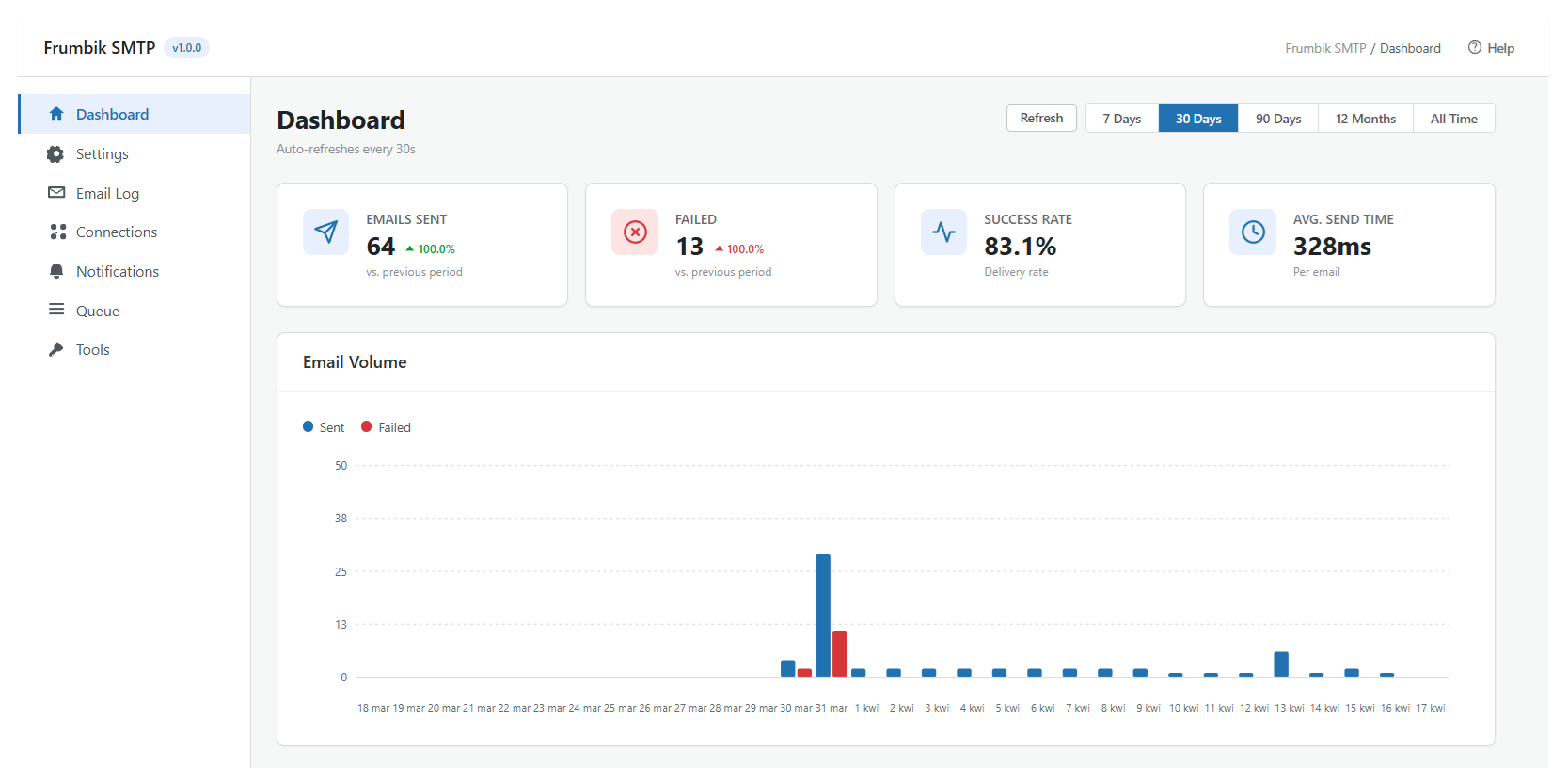
Dashboard — Real-time email statistics with delivery charts, success rates, and recent activity. 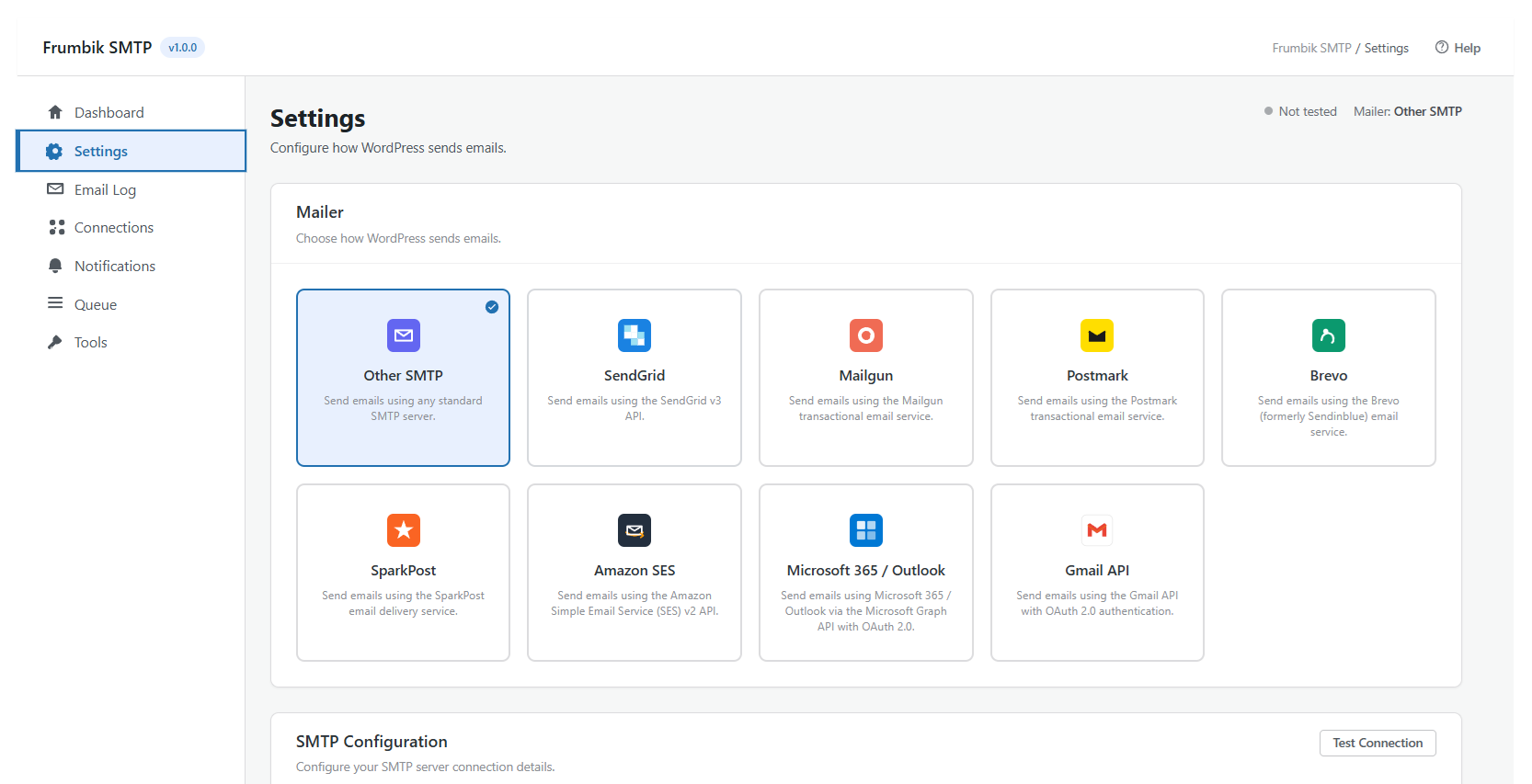
Provider Selection — Choose from 9 built-in email providers with branded icons and descriptions. 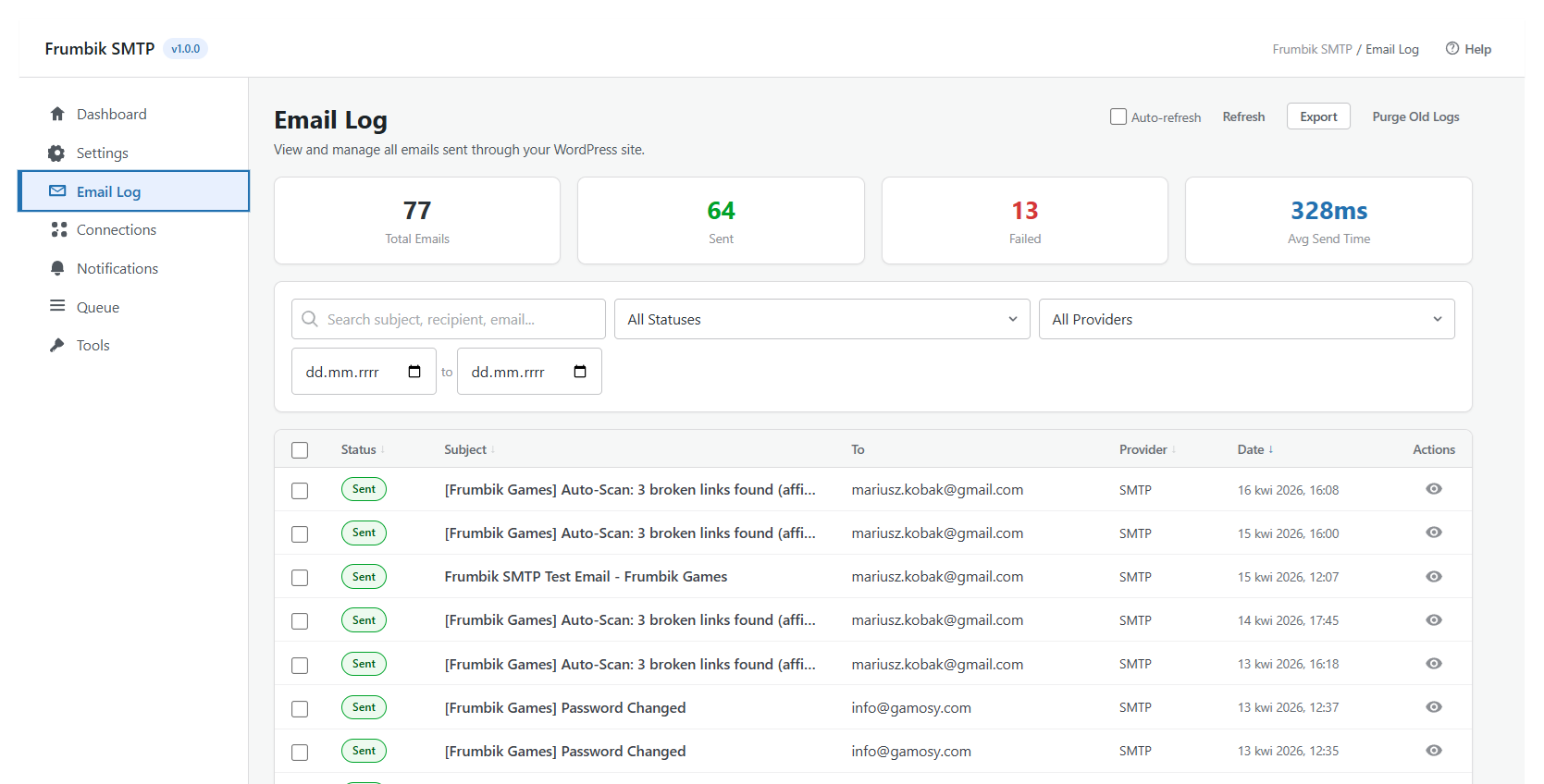
SMTP Configuration — Simple, clean configuration form with connection testing built in. 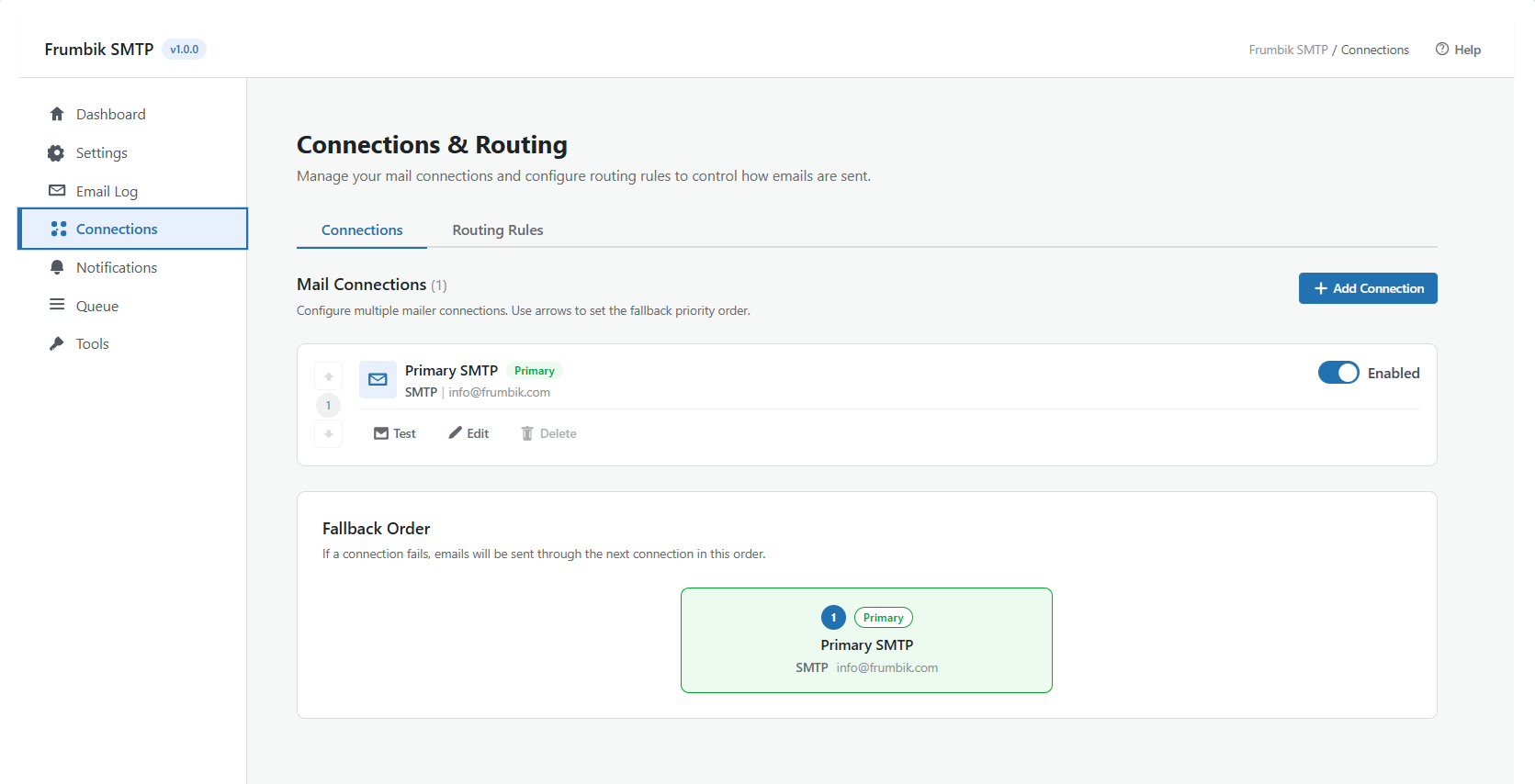
Email Log — Browse, search, and filter all outgoing emails with status badges and one-click actions. 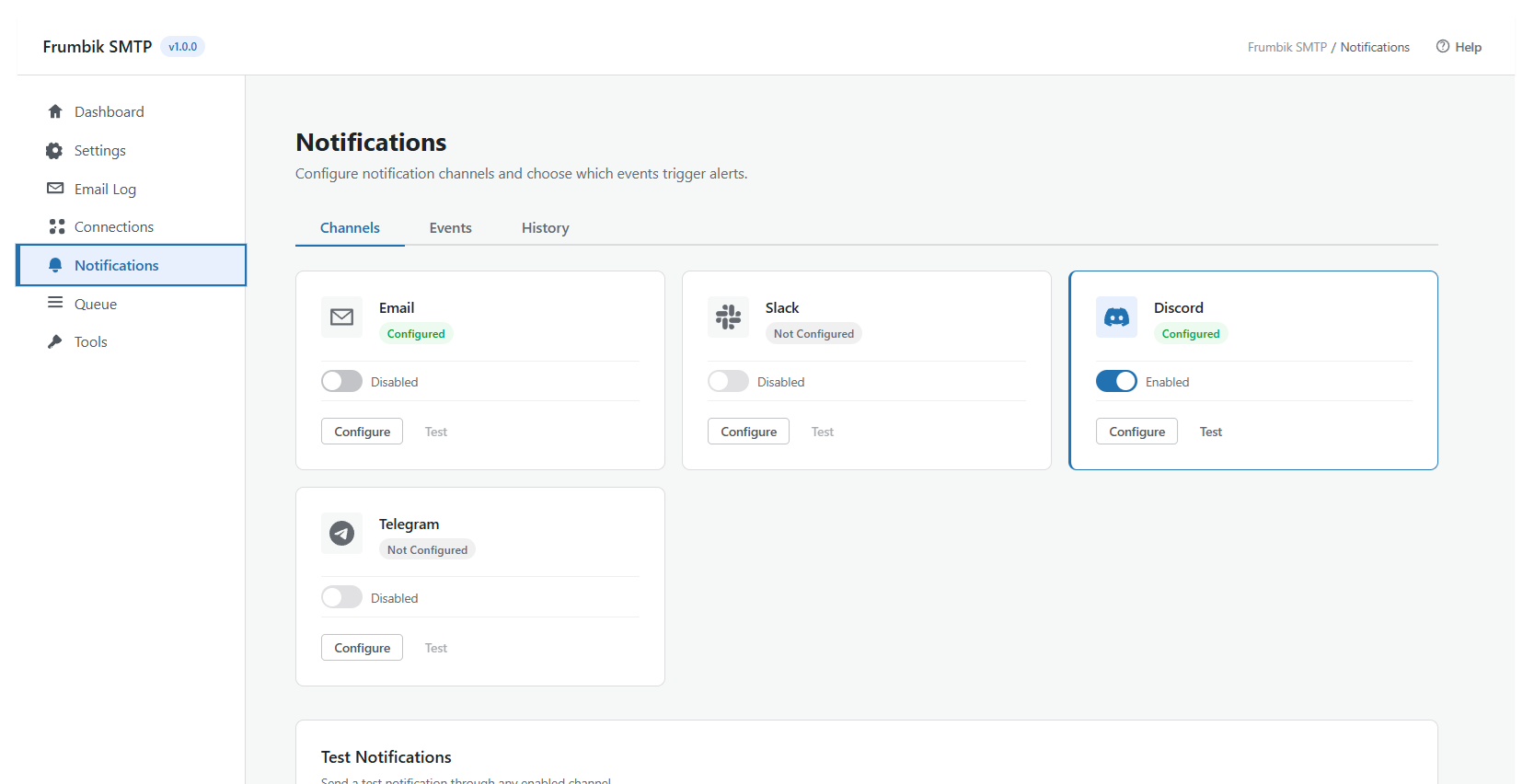
Email Detail — Full email detail view with headers, body preview, and delivery metadata. 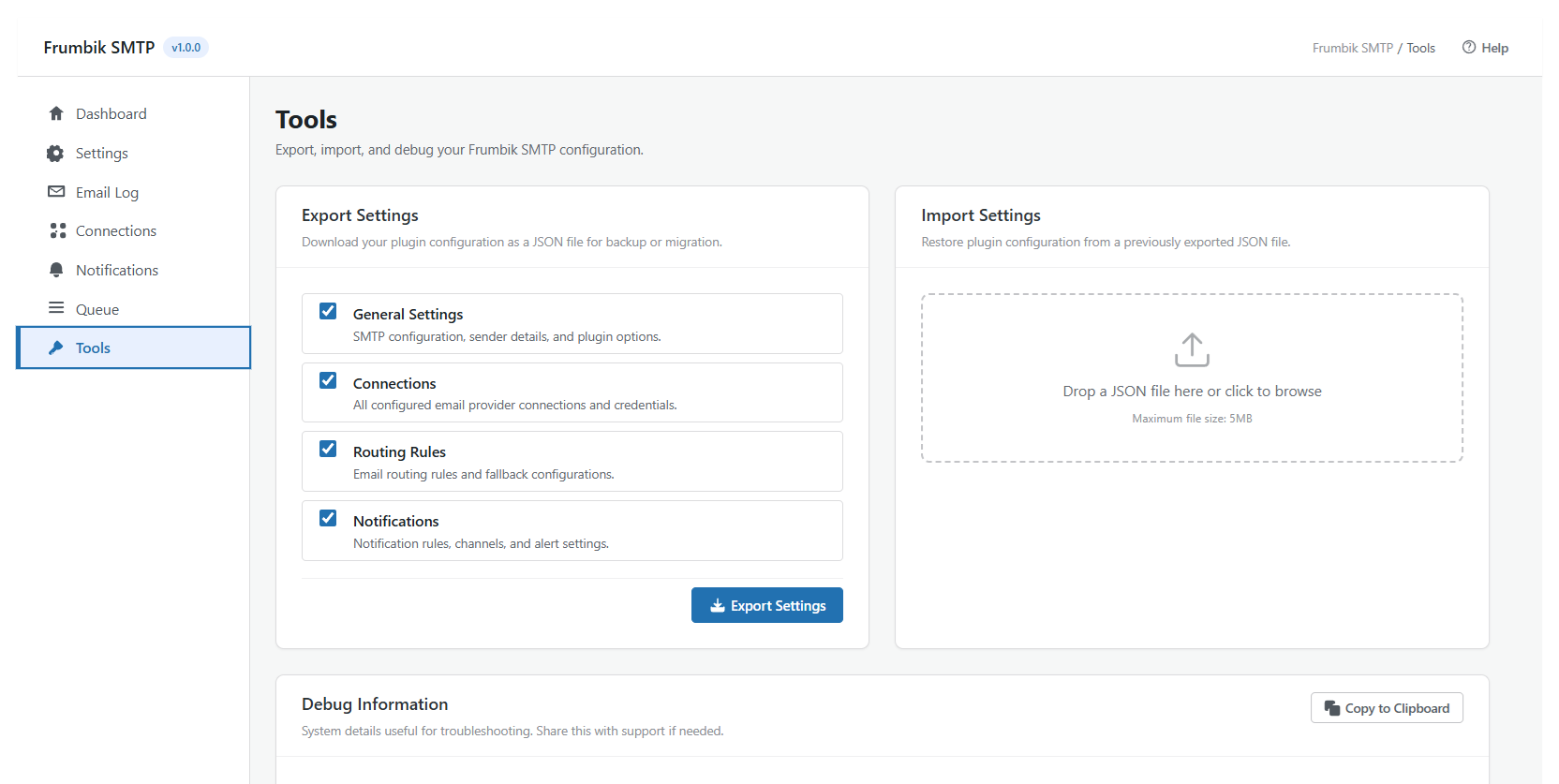
Connections Manager — Multiple provider connections with health monitoring and failover ordering.
Installation
Quick Start
- Install and activate Frumbik SMTP from Plugins Add New.
- The setup wizard launches automatically — follow the 7 simple steps.
- Click Test Connection to verify everything works.
- Done! All WordPress emails now send through your configured provider.
Manual Installation
- Download the plugin ZIP file.
- Go to Plugins Add New Upload Plugin in WordPress admin.
- Upload the ZIP file and click Install Now.
- Activate and follow the setup wizard.
Secure Configuration (recommended)
For maximum security, define your encryption key in wp-config.php:
define( 'FRUMBIK_SMTP_ENCRYPTION_KEY', 'your-random-64-character-string-here' );
Generate a strong key at WordPress Salt Generator.
You can also define SMTP credentials as constants:
define( 'FRUMBIK_SMTP_HOST', 'smtp.example.com' );
define( 'FRUMBIK_SMTP_PORT', 587 );
define( 'FRUMBIK_SMTP_USERNAME', 'your-username' );
define( 'FRUMBIK_SMTP_PASSWORD', 'your-password' );
define( 'FRUMBIK_SMTP_ENCRYPTION', 'tls' );
define( 'FRUMBIK_SMTP_FROM_EMAIL', 'you@example.com' );
define( 'FRUMBIK_SMTP_FROM_NAME', 'Your Site Name' );
Constants take priority over database-stored settings and are never exposed via the admin UI.
FAQ
-
Absolutely. Frumbik SMTP works with any hosting that supports PHP 7.4+ and allows outbound SMTP or HTTP connections. This includes Bluehost, SiteGround, GoDaddy, Namecheap, OVH, Zenbox, and virtually all shared hosting providers.
-
Will it fix my WordPress emails going to spam?
-
In most cases, yes. WordPress’s default
mail()function sends unauthenticated emails that spam filters flag immediately. Frumbik SMTP routes emails through properly authenticated connections (SMTP with TLS or native APIs), which dramatically improves inbox delivery rates. -
Does it work with WooCommerce, Contact Form 7, Gravity Forms, etc.?
-
Yes — every plugin. Frumbik SMTP hooks into WordPress’s
wp_mail()function, which means all emails from WordPress core, WooCommerce, contact forms, membership plugins, LMS plugins, and any other plugin are automatically routed through your configured provider. -
Will I lose emails if my SMTP provider goes down?
-
Not with Frumbik SMTP. Configure a backup connection and enable automatic failover. If your primary provider fails, emails seamlessly route to the backup. You can also enable the email queue, which stores emails and retries them automatically when the provider recovers.
-
Are my passwords and API keys stored securely?
-
Yes. All sensitive credentials are encrypted using AES-256-CBC with HMAC authentication before storage. The encryption key is derived from your WordPress security keys, or you can define a dedicated key in
wp-config.phpfor even stronger protection. Credentials are never stored in plaintext. -
Can I use Gmail or Outlook to send emails?
-
Yes, both are supported:
* Gmail — Connect via the Gmail API with OAuth 2.0 (no app password needed) or via SMTP
* Microsoft 365 / Outlook — Connect via the Microsoft Graph API with OAuth 2.0 or via SMTP
* OAuth tokens are securely encrypted and automatically refreshed -
Is this plugin free?
-
Yes. All features listed above are included in the free version.
-
Can I migrate from WP Mail SMTP or Post SMTP?
-
Yes! The setup wizard can automatically detect and import settings from WP Mail SMTP, Post SMTP, Fluent SMTP, and Easy WP SMTP. Your existing configuration is migrated in one click.
-
Does the email queue work with WP-Cron?
-
Yes. The email queue is powered by WP-Cron with configurable batch sizes and intervals. For high-volume sites, we recommend setting up a real server-side cron job for more reliable timing.
-
Is it compatible with WordPress Multisite?
-
Yes. Frumbik SMTP fully supports Multisite with network-wide or per-site configuration options and a dedicated network admin panel.
-
Where can I get support?
Reviews
There are no reviews for this plugin.
Contributors & Developers
“Frumbik SMTP” is open source software. The following people have contributed to this plugin.
Contributors
Translate “Frumbik SMTP” into your language.
Interested in development?
Browse the code, check out the SVN repository, or subscribe to the development log by RSS.
Changelog
1.0.0 – 2026-03-31
Initial Release 🎉
Initial public release.
- 9 Mail Providers — SMTP, SendGrid, Mailgun, Postmark, Brevo, SparkPost, Amazon SES, Microsoft 365, Gmail API
- OAuth 2.0 — Native OAuth for Gmail and Microsoft 365 (no app passwords required)
- Email Logging — Complete log with search, filter, resend, export, and source detection
- Multi-Connection Failover — Automatic failover between multiple configured providers
- Smart Routing — Route emails to providers based on recipient, domain, subject, or source plugin
- Email Queue — Async delivery with retry, exponential backoff, and batch processing
- Notifications — Failure alerts via Email, Slack, Discord, and Telegram
- Security — AES-256-CBC encryption, security score, audit log, rate limiting, 6 custom capabilities
- Setup Wizard — 7-step guided setup with automatic import from competing plugins
- Modern Admin UI — React-powered SPA with real-time dashboard and responsive design
- Import / Export — Full config backup and migration between sites
- Multisite Support — Network-wide or per-site configuration with network admin panel
- Developer Tools — IoC container, PSR-4, REST API, 30+ hooks, extensible provider interface